Some time back, I read on @TheAnand’s blog about a HSPDA WANN Card. Once during a hangout I got to use the same on his laptop. Man! 3G is fast.
Following his steps, I ordered a similar card on ebay and finally got it working this week. Here is what you need to get and what you need to do to stay connected on the move using BSNL 3G.
Unlike the USB broadband connections, this card is placed inside the laptop, so the whole thing is an integrated unit, nothing to carry around and absolutely nothing protruding. It looks as if the laptop is born with internet 😉
Things you would Need
- A Laptop with a Sim Card Slot. My Dell Studio 15 has a hidden Sim card slot under the battery compartment, you will need it.
- Option GTM378 PCI-E HSPDA Module. Order it here.
- A 3G GSM SIM. I bought a BSNL 2G SIM which is available for free and then upgraded it to 3G for free. A 3G sim costs Rs. 120.
- Drivers and a couple of Software’s, I have included download links below.
Unboxing Option GTM 378
Here are some shots of the pci-express card. My Card came with a 3G Antenna.
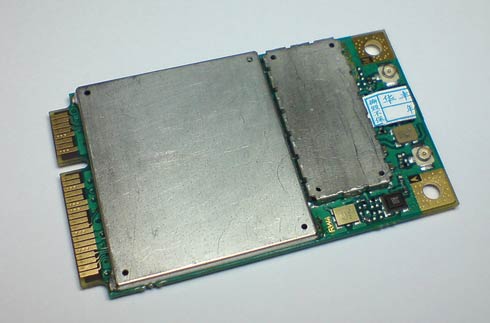
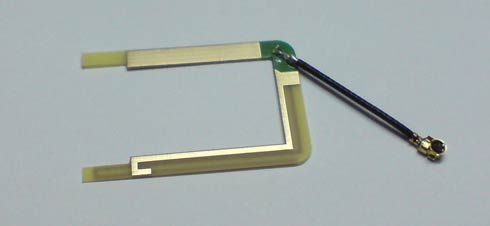

Step By Step – Installing the Card
Order a similar card on ebay (this is the one I bought) or get one from a local shop. From what I know, it costs around 4500 INR here locally, but I got it online for 43$ which is only half that cost.
Open up the back compartment of your Laptop and install the Card. The Antenna port or connector marked A is the port for GPS Antenna (Refer this). We are supposed to plug in the 3G Antenna to the other connector (one not marked A), but since I had spare wires on my laptop, which I assumed to be connected to some kind of internal antenna, I connected one of those to the 3G antenna connector and connected the 3G Antenna to the GPS slot (the one marked A).
I haven’t been able to lock on to any satellites yet, maybe its because of the connection as said above. Anyway 3G works great, have to figure out the GPS issue soon, will keep you posted.
OK, once the stuffs are in place, close the compartment. Restart your PC.
Now Windows will detect new hardware and try to install drivers. If you are on Windows 7, you probably wont need any driver.
Download Drivers
If you are on Vista or XP, you probably need a driver. Use the download links given below.
- Driver Software – For Windows to Detect the Card. Go here and Select ‘Driver Win’.
- Connectivity Software – For Windows to Connect to the Network. Go here and Select ‘Dashboard Win’.
Install the driver first and restart your computer. The installation will complete and windows will show a installation success message. Now install the Dashboard software.
> Check this forum for many FAQ’s
Buy a 3G SIM
I got mine from BSNL, as I said earlier, a 3G sim costs 120 bucks. Instead buy a 2G sim which comes for free, and upgrade it to 3G, again for free. Plug the SIM to its port and restart your pc.
Make sure 3G is active on the SIM (check by dialing *123# from a mobile with the sim and see if the plan says ‘3G General’ in it or something similar). Open up the Dashboard we installed earlier. Its called GlobeTrotter Connect. Click on “show settings” and you have to enter a APN. This is tricky.
The APN depends on the the mobile number of the SIM.
- @TheAnand uses ‘gprssouth.cellone.in‘ (without the quotes of course)
- I use ‘bsnlnet‘. I got it from here.
- You could get some more from this list here.
Both username and password are meant to be left blank. If that doesn’t work, try what is said in the link above.
If you get it right, when you press Connect, it would connect to the internet and you can start Browsing.
> Find Details of the 3G Data Plans here
OK, So I got GPS?
Well, Not yet. But I got the GPS thingy activated and it started searching for satellites successfully. Have to resolve that issue, should be an issue with the antenna (now that I am using the 3G antenna with it) or poor signal strength or something.
Here are some links that will give you a head start. GPS is disabled on the card by default (why would they do that?)
- GPS Activation Details and Some Useful Links from @TheAnand
- How to Enable GPS on Option GTM 378 – The official Version
- HyperTerminal For Vista
- Free GPS Softwares for Windows
Ok, Have fun, Stay Connected and Move Your A$$ around. lol.


Leave a Reply